Rocket Mortgage
- 4.7
- Rating
- 1.00M
- Installs
- Free
- Price

 Analysis by App-foxy
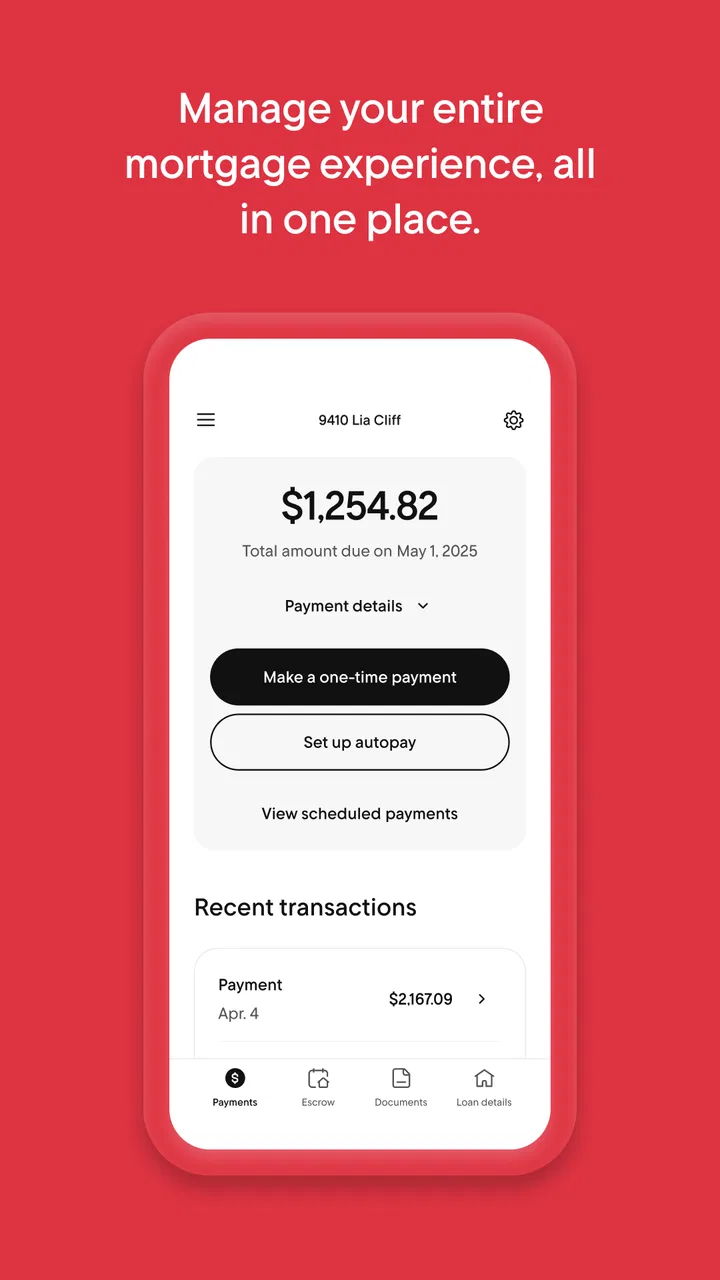
Managing a mortgage is rarely a one-minute task. There are statements to check, payments to remember, documents to find, and questions that tend to appear when I am already busy. Rocket Mortgage is built around bringing those mortgage tasks into one mobile finance app instead of making me rely on paper mail, browser bookmarks, or repeated phone calls. After spending time with it, I see its main value less as a flashy financial tool and more as a practical account companion for people who want their home loan within easy reach.
The app comes from Rocket Mortgage, is free to download, and is available to an Everyone audience. It has been around since Aug 6, 2011, which gives it a longer history than many newer financial apps. Its current version is 10.25.0, and it requires at least OS 10. That last detail is worth checking before installation, particularly if you keep an older phone for banking or household administration.
Its public reception is strong: the app holds a 4.8 average from around 30 thousand ratings, with roughly 14 thousand written reviews, and it has passed one million installs. Those figures do not replace my own judgement, but they suggest that the app is familiar to a substantial number of borrowers. The more important question is whether its controls and day-to-day workflow suit the way you prefer to handle sensitive financial information.
You May Also Like

 Blood Strike: 2.5 Anniversary
Blood Strike’s Loadouts Turn Every Drop Into a Tactical Gamble
A close look at Blood Strike’s custom loadouts: how fast access to signature weapons reshapes its battle royale rhythm, rewards preparation, and narrows the gap between fights.

 Pandora - Music & Podcasts
Pandora’s Music Is Easy to Start, but Harder to Recover
Pandora’s strength is its low-effort path from a seed to a station. Its weak spot is how much confidence it asks you to place in connection, setup, and quiet recovery.

 8 Ball Pool
 Is Built on Rivalries, Rematches, and Routine
A close look at the rivalries, rematches, shared routines, and unanswered safety questions that turn a quick pool match into a persistent mobile community.

 Samsung Music
’s Quiet Strength Is Playing What You Already Own
Its reach comes less from spectacle than from dependable access to a personal library. That simplicity is both the app’s strongest retention engine and its ceiling.

 AccuWeather: Weather Radar
AccuWeather Review: A Quick, Clear Forecast for Everyday Decisions
For everyday plans, the best forecast is the one you can understand quickly. AccuWeather makes rain timing, radar, and local conditions easy to act on, with a few trade-offs.

 Hill Climb Racing
Why Hill Climb Racing Still Turns Crashes Into One More Run
A tiny car, a bumpy hill and one more upgrade: Hill Climb Racing keeps resurfacing because its simple chaos makes every near-miss feel personal.
More From Our News Desk



What I found behind the convenient mortgage dashboard
I found the app most useful when I treated it as a focused mortgage workspace rather than a shortcut for every financial decision. In this section, I look at the small routines and account checks that make mobile access more dependable, including how I would prepare before acting on a payment or account detail. That practical baseline also makes it easier to see which settings deserve attention next.
A focused tool rather than a general money manager
Rocket Mortgage is a mortgage management app, not a replacement for a complete budgeting package, investment dashboard, or bank account hub. That narrow purpose is actually one of its strengths. When I open it, the relevant mental context is already clear: I am dealing with a home loan. I do not have to sort mortgage information from spending categories, credit-card offers, or unrelated financial charts.
This focus makes the app especially useful for homeowners who want a quick way to stay connected with their loan between larger financial reviews. I can imagine checking it while preparing a monthly household budget, confirming that a payment has been handled, or looking for an account detail before speaking with a lender or tax professional. It is also a sensible companion for someone who dislikes managing mortgage paperwork through a desktop browser.
There is a trade-off. A specialist mortgage app cannot provide the broad overview that a personal-finance aggregator may offer. If my main goal is to compare mortgage costs with groceries, utilities, savings, and investments on one screen, I would choose a broader financial tool and use this app only for the loan itself. Rocket Mortgage makes more sense when accuracy and direct access to the mortgage account matter more than seeing every financial product together.
Why the developer and account context matter
With a finance app, I pay attention to who is responsible for the account experience. Here, the developer is Rocket Mortgage rather than an anonymous third-party organizer. That gives the app a clear relationship to the mortgage brand and makes it easier for me to understand why the information shown is relevant to my loan. It also means I treat the app as an account-management channel, not as a casual calculator I can use without considering login security and privacy.
The app’s age rating is Everyone, but that should not be confused with the sensitivity of the activity. A mortgage account contains information that deserves adult-level care even when the store classification is broad. I would avoid signing in on a shared device, handing an unlocked phone to someone else, or leaving account screens visible in a public place. The rating describes audience suitability; it does not make financial access low-risk.
I also appreciate that the app’s purpose is easy to identify before I use it. Its store positioning is about managing an entire mortgage from one place, and the experience follows that direction. There is less temptation to treat it as a general-purpose financial marketplace. For me, that clarity supports trust because I can judge the app against a specific job instead of expecting it to solve every money problem.
Controls I would check before relying on it
The first control is access to the account itself. I would install the app only through the official Android or iOS store, confirm that the developer name matches Rocket Mortgage, and avoid entering credentials after following an unexpected message or advertisement. That is not a special feature claim; it is a practical boundary I use with any mortgage service. A convincing imitation can be more dangerous than an ordinary app with a poor interface.
Once signed in, I would look carefully at the account screens and menus before making a payment or changing anything. I want to know which actions are informational and which actions create a financial commitment. A useful habit is to review the recipient, amount, date, and confirmation screen rather than tapping through quickly because the task feels familiar.
I would also inspect the device’s permission settings instead of accepting every prompt automatically. The permissions shown by the operating system are the right place to verify what the installed version requests. If a permission seems unrelated to the task I am trying to complete, I would pause and investigate through the app’s own support channels before continuing. This is a better trust test than assuming that a finance label guarantees perfect privacy.
Account controls deserve the same attention. I would check how to sign out, how to recover access, and where to find support if a login or payment looks wrong. I would not save mortgage credentials in an unsecured note, and I would use the phone’s screen lock. If the device supports a secure password manager, that is preferable to reusing the same password elsewhere.
Where sensitive moments happen
The most sensitive moment is not necessarily opening the balance. It is taking an action that affects the loan. A payment, an account update, or a request for assistance can have consequences beyond the app screen. My approach would be to use a private connection, verify the details twice, and keep the confirmation information until the transaction is clearly reflected in the account history or another trusted record.
Notifications are another small but important privacy decision. A reminder can be useful, especially when a mortgage payment competes with many household bills. At the same time, a lock-screen message may reveal that I have a mortgage relationship or expose part of an account event to anyone nearby. I would choose the least revealing notification setting that still helps me remember important tasks.
Documents and messages require similar care. If the app displays account correspondence or lets me review mortgage-related material, I would avoid forwarding screenshots casually. A screenshot can include names, balances, reference details, or other information that is harmless in context but risky when shared. For record keeping, I would store documents in a protected location and delete temporary copies from photo galleries or downloads when they are no longer needed.
These habits are especially relevant when using a family tablet, a work phone, or a device connected to cloud backups. Convenience can quietly expand the number of places where financial information appears. I would rather spend a few minutes checking those settings than assume that the app alone controls every copy of the information on my device.
A realistic monthly workflow
Imagine that my mortgage payment is due during a week when several other bills arrive. I would open Rocket Mortgage in a private setting, review the account information, and confirm the payment details before submitting anything. Afterward, I would save the confirmation in a secure place and return later to make sure the account reflects the expected status. That workflow is deliberately unhurried; the app may make access faster, but speed should not turn a financial decision into an automatic tap.
At the end of the month, I might use the app again while reviewing household expenses. The mortgage payment is easier to reconcile when I can check the relevant account directly instead of hunting through old emails or paper statements. If I notice something unfamiliar, I would contact Rocket Mortgage through an official support route rather than trying to resolve a potentially serious issue through an unverified message or social-media reply.
A second useful scenario is preparing for a conversation about the loan. Before calling, I could review the account context so that I know which question I need to ask. That can make a support interaction more focused. However, I would not assume that the mobile screen answers every contractual, tax, or legal question. For those matters, I would use the app as a reference point and ask the appropriate professional for a definitive explanation.
Where it improves on the usual alternatives
The traditional alternative is a browser, paper statement, or phone call. Paper is useful for long-term records but slow to search and easy to misplace. A browser can provide detailed access, yet it may feel excessive when I only need to check the mortgage account. A phone call is valuable for unusual problems, but it is not the most efficient way to review routine information.
Rocket Mortgage sits between those options. It offers the immediacy of a mobile account view while keeping the subject limited to the mortgage. Compared with a general banking app, its advantage is context: I am less likely to confuse the home loan with an unrelated account. Compared with a personal-finance aggregator, its advantage is directness, while the aggregator may be better for seeing the mortgage alongside a complete household balance sheet.
That comparison also explains who should skip it. If I do not have a Rocket Mortgage relationship, I would not download it expecting a universal mortgage marketplace or a complete borrowing comparison tool. If I prefer paper records, never use mobile account access, or need a broad budget planner, the app may add little. It is most useful when I want a direct, recurring connection to a Rocket Mortgage account.
Practical friction I would not ignore
Any finance app can become frustrating when a login expires at the wrong time, a device is replaced, or an account detail needs clarification. I would plan for those moments rather than treating the app as my only record. Keep important mortgage documents in a secure backup location, know how to reach official support, and do not delay contacting the lender if a payment or account status looks incorrect.
The mobile format can also encourage shallow checking. A compact screen is convenient, but it may not be ideal for reading lengthy notices or comparing several pieces of documentation. For complicated decisions, I would use a larger screen or another official channel and take time to read the full material. The app is strongest for access and routine awareness, not necessarily for replacing every detailed conversation or document review.
Another limitation is the boundary between visibility and understanding. Seeing a figure on a screen does not automatically explain how it was calculated or what it means for my long-term loan. I would be cautious about drawing conclusions from a single balance or transaction line. If the question involves interest, taxes, insurance, payoff terms, or a change in contract, I would ask for clarification instead of guessing from the interface.
Who gets the most value from it?
I would recommend Rocket Mortgage to a borrower who wants a free, straightforward way to keep mortgage information close at hand and who is comfortable maintaining good mobile-security habits. It should appeal to people who check finances on their phone, prefer digital organization, and want to reduce dependence on paper or routine calls.
I would be more cautious about recommending it to someone who shares devices, has difficulty protecting passwords, or expects one app to manage a complete financial life. In those cases, the convenience may not outweigh the privacy and organization challenges. A secure browser session, paper records, or a broader financial tool may be a better fit depending on the person’s priorities.
For households, I would also discuss access boundaries before installing it. A partner may help with budgeting without needing unrestricted access to every account action. Each person should understand who can sign in, where notifications appear, and how payment decisions are confirmed. The app can support shared household planning, but the responsibility for access should remain deliberate rather than informal.
My cautious verdict after using it
Rocket Mortgage succeeds because it keeps a complicated subject close to the task I actually want to complete: staying aware of a mortgage account. Its long availability, strong average rating, and large installed base make it a familiar option, while the free price removes a common barrier to trying it. The current version, 10.25.0, is worth checking against the operating-system requirement before installation.
My positive view comes with a clear condition: I would use it as one secure channel, not as my only source of records or explanation. I would verify permissions through the device, control notification visibility, protect the login, review payment details carefully, and preserve important confirmations. Those steps are not burdensome, but they matter because mortgage information is more sensitive than the app’s Everyone rating might suggest.
The best reason to choose Rocket Mortgage is controlled convenience, not blind automation. It can make routine mortgage awareness easier and reduce the friction of checking an account. It is not the right answer for broad financial planning, complex loan interpretation, or people who cannot protect mobile account access. For a Rocket Mortgage borrower who wants a focused app and is willing to stay attentive at sensitive moments, I think it is a sensible addition to a careful home-finance routine.
In the end, I would install Rocket Mortgage when the goal is direct mortgage access from a phone, while keeping secure records and official support available for anything important or unusual. That balance gives the app room to be genuinely useful without asking it to do more than a mortgage companion should.
FAQs for Rocket Mortgage
01What is Rocket Mortgage, and how does it work?
Rocket Mortgage is a digital platform that simplifies the mortgage loan process by allowing users to apply for and manage their home loans entirely online. Through its user-friendly app, you can submit financial information, get approved for loans, and track your mortgage status without the need for traditional paperwork or in-person meetings.
02Is Rocket Mortgage secure for handling my personal information?
Yes, Rocket Mortgage prioritizes the security of your personal data. It employs advanced encryption technologies to protect your information and adheres to strict privacy protocols. Additionally, the app is regularly updated to meet the latest security standards, ensuring your data is safe from unauthorized access.
03Can I use Rocket Mortgage for refinancing my existing loan?
Absolutely, Rocket Mortgage offers refinancing options for those looking to adjust their current mortgage terms. Whether you want to lower your interest rate, change your loan duration, or access your home equity, the app provides a straightforward process to explore different refinancing options and find the best fit for your financial situation.
04What are the eligibility requirements to apply for a mortgage with Rocket Mortgage?
To apply for a mortgage with Rocket Mortgage, you need to meet certain eligibility criteria such as having a consistent income, a good credit score, and a manageable debt-to-income ratio. The app will guide you through the pre-approval process, helping you understand your eligibility and what documentation is required.
05How long does the mortgage approval process take with Rocket Mortgage?
The mortgage approval process with Rocket Mortgage is typically faster than traditional methods. Once you submit your application and necessary documents, you can receive pre-approval in as little as a few minutes. The entire process, from application to final approval, can often be completed within a few weeks, depending on your specific situation.
Pros
- Quick and easy application process.
- Competitive interest rates offered.
- User-friendly interface design.
- Real-time loan status updates.
- Comprehensive educational resources.
Cons
- Limited to U.S. residents only.
- No in-person branch access.
- Some fees may apply.
- Requires good credit score.
- No option for manual document upload.

Rocket Mortgage
Gallery